
Cinematic Technology Product Videos
Technology products aren’t always the easiest things to make visually interesting.
A smartphone, laptop, wearable device, or software interface might be packed with innovative features, but translating those capabilities into compelling visuals takes more than pointing a camera at the product. The challenge is making technology feel tangible, exciting, and worth paying attention to.
That’s where a cinematic approach to product video comes in.
Cinematic product videos borrow techniques from filmmaking and commercial production to transform everyday product shots into something more engaging. Through intentional lighting, creative camera movement, thoughtful composition, and carefully controlled editing, even the smallest product details can become visually striking.
Whether you’re showcasing consumer electronics, digital products, or emerging technology, here are seven ways to make your next technology video look more cinematic.
1) Start with a Visual Concept, Not Just a Product
Before setting up a camera, think about how you want the audience to experience the product.
What should the product feel like? Is it futuristic and innovative? Minimalist and sophisticated? Powerful and performance-driven? Friendly and approachable?
These qualities should influence every creative decision, from lighting and color to camera movement and production design.
For example, a premium pair of wireless headphones might benefit from dramatic lighting, slow-motion product shots, and elegant camera movements. A smart home device might call for a warmer, more natural look that shows how seamlessly it fits into everyday life.
For a commercial we produced for TickTalk, we wanted to showcase their latest kids’ smartwatch with a bright and dynamic energy. We kept everything bright and full of movement.

Start with a creative concept that gives the video a distinct look and feel. Then use cinematography and editing to bring that concept to life.
2) Use Lighting to Create Depth and Dimension
Lighting is one of the most important elements in making technology products look cinematic.
Unlike people or landscapes, technology products often have reflective surfaces, glass screens, polished metals, and carefully designed contours. Poor lighting can create unwanted reflections, flatten the product’s appearance, or make it look less premium than it actually is.
As mentioned above, lighting was a key factor in our creative for the TickTalk 6 Smartwatch. Fortunately, we shot this during the summer in Newport Beach, CA, so we had plenty of great Southern California natural light to work with. For indoor shots, we used creative lighting to highlight the watch’s beautiful colors and features.
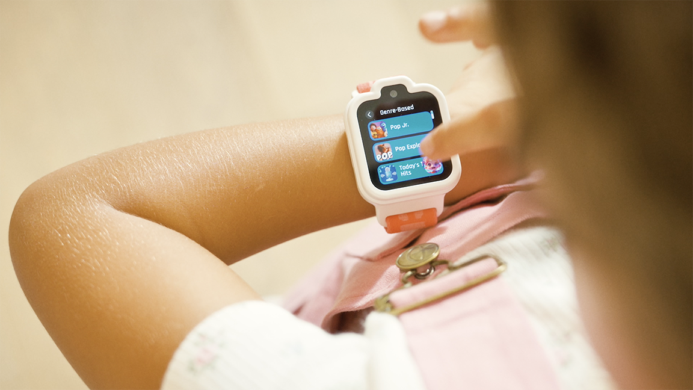
The key is to shape the light rather than simply illuminate the product.
Here are a few techniques worth considering:
- Edge lighting: Use light from behind or along the side of a product to define its silhouette and separate it from the background.
- Soft directional lighting: Create subtle highlights and shadows that reveal the product’s shape without producing harsh reflections.
- Controlled reflections: Use carefully positioned light sources to create attractive reflections on glass, metal, and glossy surfaces.
- Negative fill: Use dark surfaces to absorb light and create contrast, helping define the product’s edges and contours.
- Background separation: Introduce subtle lighting variations to create depth between the product and its environment.
The goal is to give the product dimension. Even a simple object can look sophisticated when its shape, texture, and materials are properly illuminated.
3) Make Camera Movement Feel Intentional
Camera movement can turn a static product shot into something much more dynamic.
A slow push-in can build anticipation. A smooth tracking shot can reveal the product’s design. A controlled orbit can showcase its shape from multiple angles. A macro slider move can draw attention to a small but important detail.
The important thing is to give every movement a purpose.
Some effective techniques include:
- Slow push-ins: Gradually move toward the product to build focus and anticipation.
- Tracking shots: Move alongside the product to reveal its design or create a sense of motion.
- Orbit shots: Circle around the product to showcase its form and proportions.
- Macro movements: Use subtle camera movements to highlight buttons, textures, ports, and other intricate details.
- Whip pans and transitions: Introduce energy and connect different scenes when a faster, more playful style is appropriate.
Technology commercials often benefit from a combination of controlled, elegant movements and faster, more energetic shots.
The contrast creates rhythm and keeps the video from feeling like a collection of repetitive product angles.
4) Get Close to the Details
One of the advantages of technology product videos is that there are often plenty of interesting details to explore.
A precisely engineered button, the texture of a speaker grille, the edge of a glass display, or the movement of a mechanical component can all become compelling visual moments.
Macro photography and close-up cinematography allow you to showcase these details in ways that the viewer might not notice during everyday use.
Consider using shallow depth of field to isolate specific features, selective focus to guide the viewer’s attention, and slow-motion footage to reveal movement that happens too quickly to appreciate in real time.
These shots do more than make the product look attractive. They communicate quality, precision, and craftsmanship.
For the TickTalk commercial, we set up a set just for the watch’s close ups. It was essentially just a white poster board on a table with lights and camera rigged up overlooking it. Not too complex, but we were able to get some beautiful close up shots of the watch’s features.
A well-executed close-up can sometimes say more about a product than an entire sequence of feature callouts.
5) Combine Live Action with Motion Graphics and UI Animation
Technology products often have an invisible component: the software that makes them work.
A smartphone is more than its physical design. A smartwatch is more than its screen. A connected device is more than its hardware.
To communicate the full experience, consider combining live-action cinematography with motion graphics, UI animations, and screen recordings.
For example, you could show a close-up of someone interacting with a device, transition into an animated representation of the interface, and then return to a lifestyle shot showing the product in use.
Motion graphics can also help visualize things that are difficult to film, such as data transfers, connectivity, artificial intelligence, internal components, or software processes.
The trick is to make these elements feel like part of the same visual world, and that was an important aspect of our approach to TickTalk 6. We didn’t want the spot to feel overly animated and unnatural. We kept graphics to a minimum – they’re simply there to reinforce some of the watch’s features, and not to dominate the screen with animation.
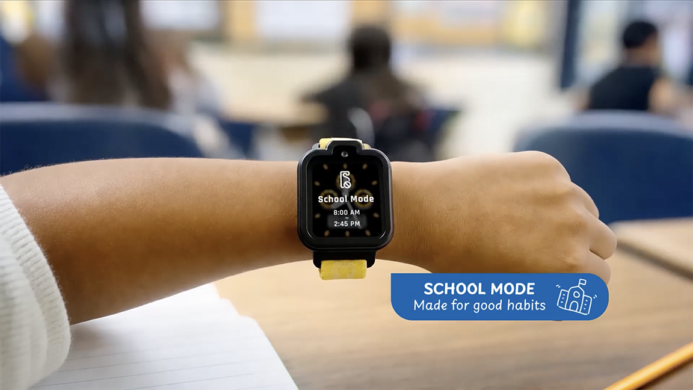
Use consistent lighting, color, perspective, and animation styles so the graphics complement the live-action footage rather than feeling disconnected from it.
When done well, the combination creates a more complete picture of the technology while keeping the video visually engaging.
6) Use Editing and Sound Design to Build Emotion
Cinematography captures the images, but editing determines how the audience experiences them.
The timing of each shot, the relationship between images, and the rhythm of the music all contribute to the cinematic quality of a video.
Consider how pacing can influence the viewer’s perception of a product.
Slow, deliberate editing can make a product feel premium and sophisticated. Faster cuts, rhythmic transitions, and energetic camera movements can communicate innovation and excitement.
Editing was a key factor to making our TickTalk6 commercial come to life. We used tight fast-paced editing to highlight the dynamics of life of a busy household with two kids and two working parents. Check out the full video here:
Sound design is equally important.
Subtle mechanical sounds, button clicks, electronic tones, ambient textures, and carefully timed transitions can make product interactions feel more tangible.
Music helps establish the emotional direction. A powerful soundtrack can build anticipation, while a minimal electronic score might reinforce a clean, modern aesthetic.
Don’t treat sound as something to add at the end. Think about how music and sound effects can work with the visuals from the beginning.
7) Create a World Around the Product
A cinematic product video doesn’t always need a complicated set or elaborate location. Sometimes a simple environment is the most effective choice.
However, the setting should help tell the story.
A minimalist studio environment can make a product feel sophisticated and design-focused. A carefully constructed lifestyle setting can demonstrate how technology fits into everyday life. An abstract or futuristic environment can help communicate innovation.
For TickTalk 6, we used two primary locations: a home and a park. Within each primary location, we had several different locales to demonstrate how the watch can connect kids with their parents no matter where they were throughout the day.

Production design plays an important role here.
Think about the surfaces, colors, textures, props, and backgrounds that will appear in the frame. Every element should contribute to the overall visual direction.
You can also use practical effects, reflections, atmospheric lighting, and creative set design to add visual interest without distracting from the product itself.
The objective is to create an environment that makes the technology feel more interesting and desirable.
Bringing It All Together
Making technology products look cinematic isn’t about using the most expensive camera or adding elaborate visual effects to every shot.
It’s about making intentional creative decisions.
The right lighting can reveal a product’s design. Thoughtful camera movement can create energy and anticipation. Close-ups can highlight precision and craftsmanship. Motion graphics can make complex technology easier to understand. And editing and sound design can bring everything together into a cohesive experience.
Most importantly, great technology videos balance aesthetics with information. They make the product look impressive while giving viewers a clear understanding of what makes it special.
At Picturelab, we combine creative direction, cinematic cinematography, and thoughtful post-production to make technology products stand out. From consumer electronics and connected devices to software platforms and emerging technologies, we create videos that bring innovation to life through compelling visuals and storytelling.
Technology is constantly evolving. The way we showcase it should be just as innovative.
Picturelab has been producing videos for technology products since 2009. We have produced hundreds of videos for Google, Samsung, Facebook, Intuit, Autodesk, and dozens of startups. We’re based in Silicon Valley with a second office in Irvine, CA. Both Mountain View and Irvine are tech hubs so we know how to shoot technology.
To see how we can help with your technology product videos, contact us at info@picturelab.com.